

Paying invoices used to mean one invoice, one page, one payment. A customer who owed on six invoices paid six times. The new Pay Now page replaces all of that with one place to pay: a single invoice, a stack of them, a statement or the whole account balance, in one payment.
What your customers can do
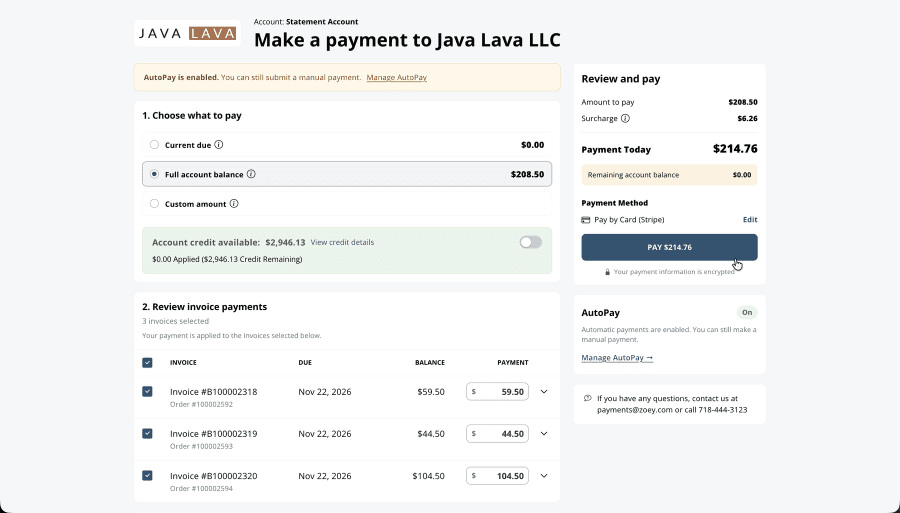
- Choose what to pay with one tap: Current Due, Full Account Balance, a Statement Balance, or a custom amount that Zoey spreads over the selected invoices, oldest due first.
- Pick the invoices. Check or uncheck invoices, or change what each one pays. “Pay More Invoices” shows everything else they owe.
- Use their account credit. Available credit is applied automatically, oldest due first. Customers can move it between invoices or turn it off. When credit covers everything, one click applies it, no card needed.
- Pay their way: saved cards, a new card, ACH bank accounts or PayPal Express, whatever you allow, with any surcharge shown before they pay.
- See the details without leaving the page: due dates, past-due and early-pay discount badges, line items and invoice PDFs.
- Get a receipt showing exactly how the payment was applied to each invoice, download it as a PDF, and make another payment if a balance remains.
- Pay from their phone. The page is built for mobile as much as desktop.
Every pay link now goes here
- Make A Payment in My Account opens every open invoice for the account.
- The Pay Now button in invoice emails, invoice PDFs and the invoice list opens the page with just that invoice, with the full account balance one click away. Old invoice pay links redirect automatically.
- Statement links open that statement’s invoices, starting on the statement balance.
- Orders without an invoice can be paid from the order page. The payment creates the invoice.
- Guests can pay an invoice from their email link without logging in, when you allow it.
Built for B2B accounts
- Customers pay for the account they have selected, and an invoice link for another of their accounts switches to it.
- Statement-billed accounts pay a statement or their full account balance.
- Deposit requests are marked as deposits, and Current Due pays exactly the deposit. Deposits already on file come off the balance first.
- Credit reserved for another order stays reserved. Only your team can move it.
- The page shows whether AutoPay is on for the account and links account managers to set it up.
For your team
- Pay Now in the admin payment editor and invoice editor now charges right on the screen, deposits included, with no pop-up.
- Admin Pay Now applies the account’s available credit automatically.
- A customer’s payment note is saved on the payment.
You stay in control
Find the settings under Order Settings › Invoicing:
- Allow Invoice Payment turns customer invoice payment on or off.
- Allow Customer To Pay Order Without An Invoice lets customers pay an order from the order page before it’s invoiced.
- Allow Partial Payment Of Orders Without An Invoice lets them pay part of it. It’s off by default, so those orders are paid in full.
- Allow Invoice Pay Without Login lets guests pay from their invoice link.
- Help Text, Login Help Text and Pay Invoice Page Logo customize the page.
The new Pay Now page goes live Wednesday, November 18, for every store using Invoicing. Questions before then? Contact Zoey Support. Read the support guide »
